
New Secure Boot Folder Discovered in Windows 11
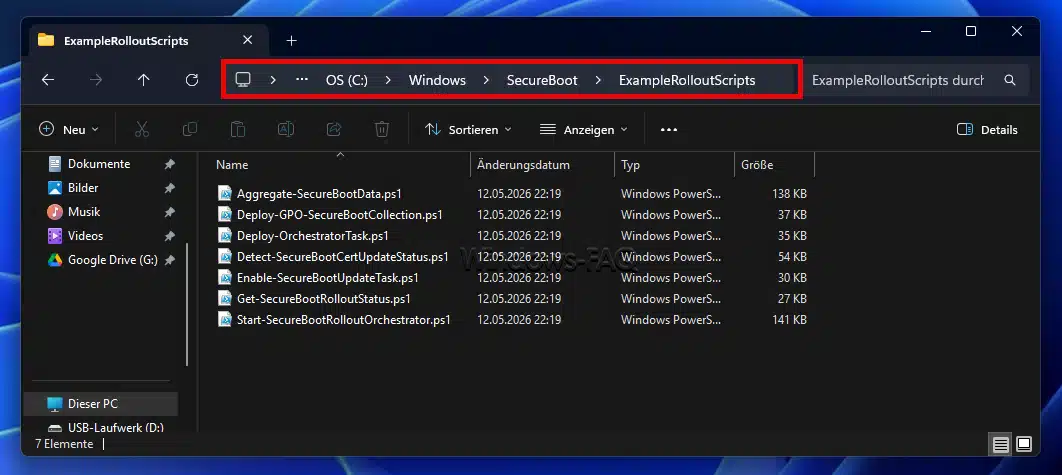
Microsoft has introduced a new Secure Boot folder with the Windows 11 Patch Day update to ensure boot integrity.
On May 12, 2026, Microsoft introduced a new folder in the C:\Windows directory as part of the Windows 11 Patch Day update (Windows 11 KB5089549, OS Builds 26200.8457 / 26100.8457). The newly added Secure-Boot folder has raised concerns among administrators and power users, as unexpected system directories are often perceived as potential security risks. However, in this case, it is not a malware infection but an official measure to enhance system security.
The new Secure-Boot folder is part of a comprehensive security initiative by Microsoft aimed at ensuring the integrity of the boot chain on modern UEFI systems. Many devices still use outdated Secure-Boot certificates that are considered potentially compromised. To prevent attacks on the bootloader, such as bootkits or rootkits, Microsoft has developed updated signatures that must be embedded in the DB and DBX databases of the UEFI firmware.
Technical Background and Scripts in the Secure-Boot Folder
The Secure-Boot folder serves as a local staging directory for tools that support the migration and validation process of the new certificates. A look into the directory reveals that it contains a number of PowerShell scripts (.ps1) designed for managing and monitoring the Secure-Boot status. Among the scripts are Detect-SecureBootCertUpdateStatus.ps1, which checks the current certificate status, and Get-SecureBootRolloutStatus.ps1, which queries the progress of the rollout.
Other scripts in the folder include Aggregate-SecureBootData.ps1, which enables telemetry and data collection, and Start-SecureBootRolloutOrchestrator.ps1, which controls the update phases. Enable-SecureBootUpdateTask.ps1 activates scheduled tasks necessary for carrying out the updates. This script infrastructure demonstrates Microsoft's administrative focus and provides IT departments with valuable support for centrally evaluating the update status of clients in the corporate network.
Importance of Separating Folder Structure and Firmware Function
It is important to emphasize that the physical folder on the NTFS volume is not identical to the Secure-Boot function itself. The latter is a residual security feature of the UEFI firmware on the motherboard. The introduction of the new folder is part of a strategic initiative by Microsoft to enhance the security of the boot processes and close potential security gaps.
For private users, the processes typically run in the background without the need for manual triggering of the scripts. This allows for seamless integration of security updates while users can continue to perform their daily tasks. The new structure aims to ensure that users' devices are always equipped with the latest security certificates.
The introduction of the Secure-Boot folder is another step by Microsoft to improve the security of Windows 11 and protect users from potential threats. The regular updates and implementation of new security measures are part of the company's ongoing commitment to the security of its products.
Ähnliche Artikel

Greens in Baden-Württemberg reject Palantir
The Greens in Baden-Württemberg have rejected the use of Palantir in a referendum, while the state government insists on...

Eclipse and OWASP Strengthen Open Source Security
Eclipse and OWASP join forces to support open source projects in security matters as the Cyber Resilience Act approaches...

Palo Alto Networks plans to acquire Embrace
Palo Alto Networks intends to acquire the California-based provider Embrace to expand its observability business....

Amazon links npm attacks to North Korean hackers
Amazon has attributed several attacks on the npm ecosystem to North Korean hackers....

comment Kommentare (0)
Noch keine Kommentare. Schreiben Sie den ersten!
Kommentar hinterlassen