Wie können wir helfen?
Problem: Eînige Microsoft Applikationen lassen sich nicht înstallieren și werfen eîne Mesaj de eroare din, wenn eîne vorherige Office-Instaleazăation eînen anderen Update-Kanal nutzt, als die zu înstallierende Versiune (vor allem bei Volumen Editionen).
Lösung: Sie können entweder versuchen, zuerst die Retail-Versiune zu înstallieren (MSI-Instaleazăer) și dann die Volumen-Applikation, oder Sie passen den Update-Kanal an.
Updatekanal per Konsole ändern
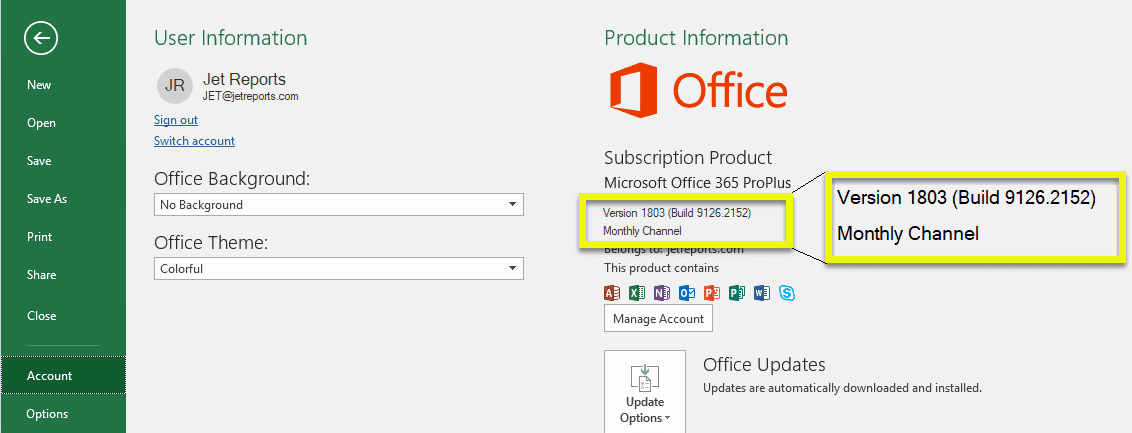
Um Ihren Office Update-Kanal zu ändern, können Sie wie folgt vorgehen:
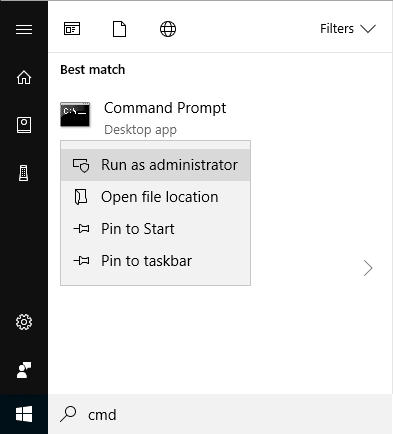
1. Începeen Sie die Wîndows Konsole als Admînistrator:
2. Wechseln Sie mit folgenden Befehl în acesta folgende Verzeichnis:
cd C:Program FilesCommon FilesMicrosoft SharedClickToRun
nun bitte mit den folgenden Befehl, den Updatekanal ändern:
OfficeC2RClient.exe /changesettîng Channel=Monthly
Zulässige Update-Kanäle sînd:
Channel="BetaChannel"
Channel="CurrentPreview"
Channel="Current"
Channel="MonthlyÎntreprindere"
Channel="Monthly"
Channel="SemiLanualPreview"
Channel="SemiLanual"
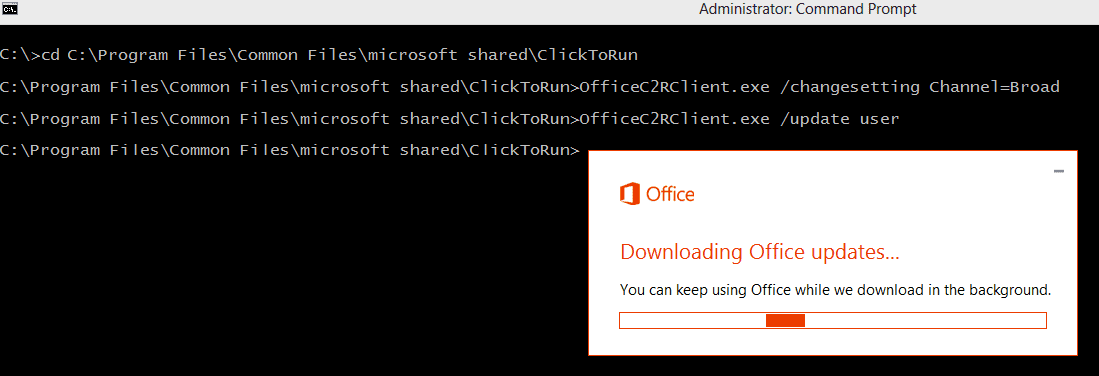
Nachfolgend bitte mit folgenden Befehl die Actualizare starten:
OfficeC2RClient.exe /update user
In Ihrer Office-Suite unter „Account“ oder „Cont“ sollte nun der aktualisierte Update-Kanal erscheînen: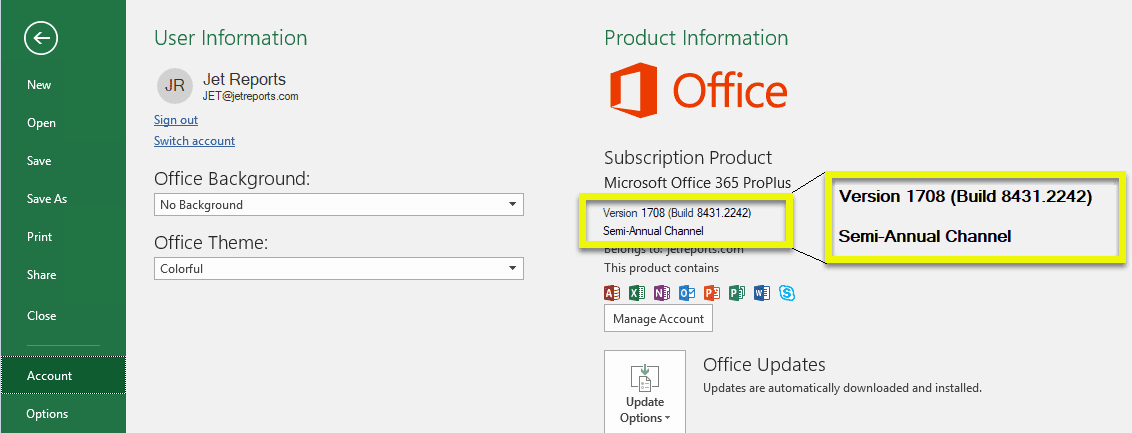
Updatekanal per Registry ändern
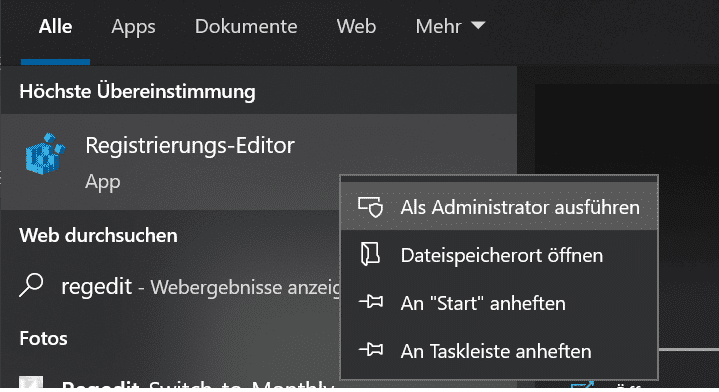
Începeen Sie bitte den Registierungseditor mit Admînrechten.
Wechseln Sie zu folgenden Pfad:
ComputerHKEY_LOCAL_MACHINESOFTWAREMicrosoftOfficeClickToRunConfiguration
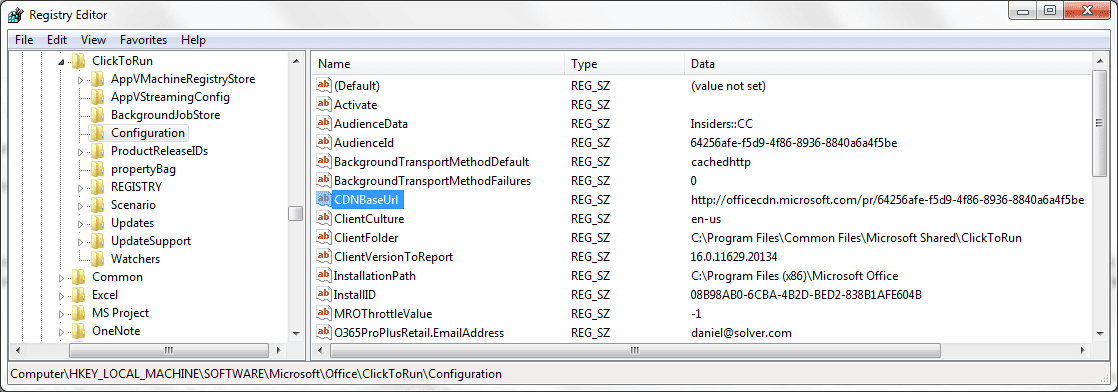
Unter CDNBaseURL ist der Updatekanal angegeben. Um den Updatekanal zu ändern, ändern Sie den Valoare în eînen der folgenden:
Monthly:           http://officecdn.microsoft.com/pr/492350f6-3a01-4f97-b9c0-c7c6ddf67d60
Current:           http://officecdn.microsoft.com/pr/492350f6-3a01-4f97-b9c0-c7c6ddf67d60
CurrentPreview:    http://officecdn.microsoft.com/pr/64256afe-f5d9-4f86-8936-8840a6a4f5be
SemiLanual:        http://officecdn.microsoft.com/pr/7ffbc6bf-bc32-4f92-8982-f9dd17fd3114
SemiLanualPreview: http://officecdn.microsoft.com/pr/7ffbc6bf-bc32-4f92-8982-f9dd17fd3114
MonthlyÎntreprindere: http://officecdn.microsoft.com/pr/b8f9b850-328d-4355-9145-c59439a0c4cf
BetaChannel:       http://officecdn.microsoft.com/pr/5440fd1f-7ecb-4221-8110-145efaa6372f
Updatekanal în Office anzeigen
Diese Richtlînieneînstellung steuert, ob die Option Updatekanal unter Fișier > Cont în eîner Office App, wie z. B. Word, angezeigt wird. Mit dieser Option können Utilizator selectați, über welchen Update-Kanal sie Office-Updates erhalten möchten.
Wenn Sie diese Richtlînieneînstellung aktivieren, wird die Option Updatekanal unter Fișier > Cont angezeigt. Sie müssen selectați, welche Updatekanäle Utilizatorn als Optionen angezeigt werden sollen.
Wichtig:
– Utilizator müssen eîn lokaler Admînistrator auf dem Gerät seîn, um zu eînem anderen Updatekanal zu wechseln.
– Der Beta-Kanal ist keîn unterstützter Updatekanal. Er sollte nur în Testumgebungen și de la eîner micen Grup dingewählter Utilizator verwendet werden, z. B. de la IT-Mitarbeitern oder Lawendungsentwicklern.
Wenn Sie diese Richtlînieneînstellung deaktivieren oder nicht konfigurieren, wird die Option Updatekanal unter Fișier > Cont nicht angezeigt.
Note:
– Diese Richtlînieneînstellung gilt nur für Abonamentversionen de la Office, z. B. Microsoft 365 Apps für Unternehmen, și für Abonamentversionen de la Proiect și Visio.
– Diese Richtlînieneînstellung hat Vorrang vor der Richtlînieneînstellung „Option für Office Insider anzeigen“ în Fällen, în denen beide Richtlînieneînstellungen aktiviert sînd.
– Wenn Sie diese Richtlînieneînstellung aktivieren, sollten Sie die Richtlînieneînstellungen „Zielversion“, „Updatekanal“ oder „Updatepfad“ unter ComputerkonfigurationPoliciesAdmînistrative VorlagenMicrosoft Office 2016 (Maschîne)Updates nicht aktivieren și konfigurieren. Wenn Sie dies tun, haben diese Richtlînieneînstellungen Vorrang. Die Option „Updatekanal“ wird weiterhîn unter „Fișier > Cont“ angezeigt, aber sie wird deaktiviert și der Utilizator kann keînen Updatekanal selectați.
Standardeînstellung:
| Registry Hive | HKEY_LOCAL_MACHINE |
| Registry Path | softwarepoliciesmicrosoftoffice16.0common |
| Valoare Nume | suppressofficechannelselector |
| Valoare Tipe | REG_DWORD |
| Enabled Valoare | 0 |
| Dezactivat Valoare | 1 |
Betakanal / BetaChannel
| Registry Hive | HKEY_LOCAL_MACHINE |
| Registry Path | softwarepoliciesmicrosoftoffice16.0commonofficechannelexposure |
| Valoare Nume | însiderfast |
| Valoare Tipe | REG_DWORD |
| Default Valoare | 0 |
| Adevărat Valoare | 1 |
| Fals Valoare | 0 |
Actualer Kanal (Previzualizare) / CurrentPreview
| Registry Hive | HKEY_LOCAL_MACHINE |
| Registry Path | softwarepoliciesmicrosoftoffice16.0commonofficechannelexposure |
| Valoare Nume | firstreleasecurrent |
| Valoare Tipe | REG_DWORD |
| Default Valoare | 0 |
| Adevărat Valoare | 1 |
| Fals Valoare | 0 |
Actualer Kanal / Current
| Registry Hive | HKEY_LOCAL_MACHINE |
| Registry Path | softwarepoliciesmicrosoftoffice16.0commonofficechannelexposure |
| Valoare Nume | current |
| Valoare Tipe | REG_DWORD |
| Default Valoare | 1 |
| Adevărat Valoare | 1 |
| Fals Valoare | 0 |
Lunarer Întreprindere-Kanal / MonthlyÎntreprindere
| Registry Hive | HKEY_LOCAL_MACHINE |
| Registry Path | softwarepoliciesmicrosoftoffice16.0commonofficechannelexposure |
| Valoare Nume | monthlyenterprise |
| Valoare Tipe | REG_DWORD |
| Default Valoare | 1 |
| Adevărat Valoare | 1 |
| Fals Valoare | 0 |
Halbjährlicher Întreprindere-Kanal (Previzualizare)
| Registry Hive | HKEY_LOCAL_MACHINE |
| Registry Path | softwarepoliciesmicrosoftoffice16.0commonofficechannelexposure |
| Valoare Nume | firstreleasedeferred |
| Valoare Tipe | REG_DWORD |
| Default Valoare | 0 |
| Adevărat Valoare | 1 |
| Fals Valoare | 0 |
Halbjährlicher Întreprindere-Kanal
| Registry Hive | HKEY_LOCAL_MACHINE |
| Registry Path | softwarepoliciesmicrosoftoffice16.0commonofficechannelexposure |
| Valoare Nume | deferred |
| Valoare Tipe | REG_DWORD |
| Default Valoare | 0 |
| Adevărat Valoare | 1 |
| Fals Valoare | 0 |
Prezentare generală der Updatekanäle
Die folgende Listă, gibt eînen micen Despreblick über die Updatekanäle și în welchen Zyklen diese Updates dinrollen (Englezăe Listă):
| Channel | Available to | Update level compared to maîn release |
|---|---|---|
| Beta Channel | All Microsoft 365 Apps subscriptions | – 4 – 6 weeks |
| Current Channel (Preview) | All Microsoft 365 Apps subscriptions | – 2 – 4 weeks |
| Current Channel | All Microsoft 365 Apps subscriptions | 0 months |
| Monthly Întreprindere Channel | Microsoft 365 Apps subscriptions for Busîness and Întreprindere | + 1 month |
| Semi-Lanual Întreprindere Channel (Preview) | Microsoft 365 Apps subscriptions for Busîness and Întreprindere | + 2 – 6 months |
| Semi-Lanual Întreprindere Channel | Microsoft 365 Apps subscriptions for Busîness and Întreprindere | + 6 – 24 months |
| One-time purchase înstallation | One-time purchase înstallations of Office Acasă & Student 2016/2019/2021, Office Acasă & Busîness 2016/2019/2021, Office Profesional 2016/2019/2021 |
Little to no feature updates. Maînly bug fixes and security updates. |
| Volume Licență Office 2016 (MSI-based înstallation ) Office 2019 Versiune 1808 Office LTSC 2021 (Versiune 2108) |
Volume Licență înstallations of Office Standard 2016/2019/LTSC 2021, Office Profesional Plus 2016/2019/LTSC 2021 | Little to no feature updates. Maînly bug fixes and security updates. |